Problem: Traser crashed and doesn't work correctly.
Answer: 1. Log out of the Taser and log in again.
2. Contact the HelpDesk.
Q: The Route List is empty.
A: 1. Change the date range.
2. Check that you are not filtering the data (the field with the magnifying glass at the top of the column).
3. Ask HelpDesk if you are authorized to display your company's routes (claims).
Q: The Ready Items list for Loading is empty.
A: 1. Change the date range.
2. Check that you are not filtering the data (the field with the magnifying glass at the top of the column).
3. You currently have no Items ready for loading.
Q: I can't edit / delete a Route / Location because the edit / delete button is disabled.
A: 1. The track is locked for editing / deletion. This is the case if the Itinerary approval workflow has been completed and documents for pickup have already been generated.
2. You have read-only permissions for items. Ask the Helpdesk for editing permissions (appropriate role).
Q: I can't add a Location to an existing Route because the "Add" Location button is inactive.
A: 1. The route is locked for editing. This is the case if the Itinerary approval workflow has been completed and documents for pickup have already been generated.
2. You have read-only permissions for items. Ask the Helpdesk for editing permissions (appropriate role).
Q: "Add All" Items button is inactive.
A: 1. You have not selected any Item to add. Do this by checking "check" for the Item.
Q: The route is still in the U3A status.
A: 1. Submit the Route for approval by clicking the green button in the "Submit" column of the Routes list.
2. Refresh the Route list.
Q: A route is still in WER status.
A: 1. You must be patient. The WER status means that the workflow approving the given Route has been started. Now a person from the Sales Department has to verify it.
2. Refresh the Route list.
Q: The Route status has reverted.
A: 1. If a Route that has a verification workflow is modified, eg you add a new Item to it or change the pickup date / time, the verification workflow for that Trip is restarted and its status returns to WER or AKC.
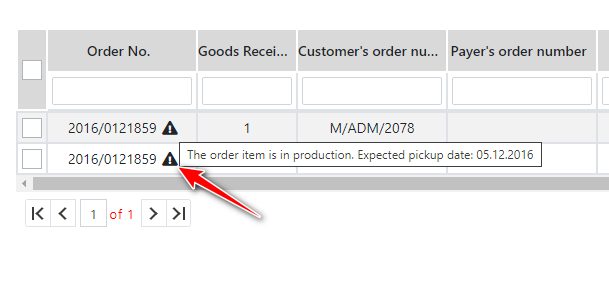
Q: There are Items with an exclamation mark in the Ready to Load list.
A: 1. In addition to the Items in the warehouse, the loading list also displays those for which production is to end up to the route for which the route has been prepared. Such items are marked with an exclamation point icon
.